Edge Workers overview and quickstart
Create a Worker, write code, bind it to domain routes, and learn the API, route matching rules and resource limits.
Edge Workers are JavaScript functions that run on CDN edge nodes. When a request reaches the edge and passes security checks, a Worker whose route matches runs before the cache lookup and before the request goes to your origin. A Worker can:
- Respond directly: return custom content or a redirect, without contacting the origin.
- Rewrite the origin request: add or overwrite request headers (and optionally change the method and path), then continue to the origin.
- Pass through: change nothing, so the request is handled by the domain's normal configuration.
The programming model follows Cloudflare Workers: export export default { fetch(request, env, ctx) } and return a Response. Every execution runs in a fresh, isolated sandbox. No global state is shared between requests.
Console pages
| Page | Location | Purpose |
|---|---|---|
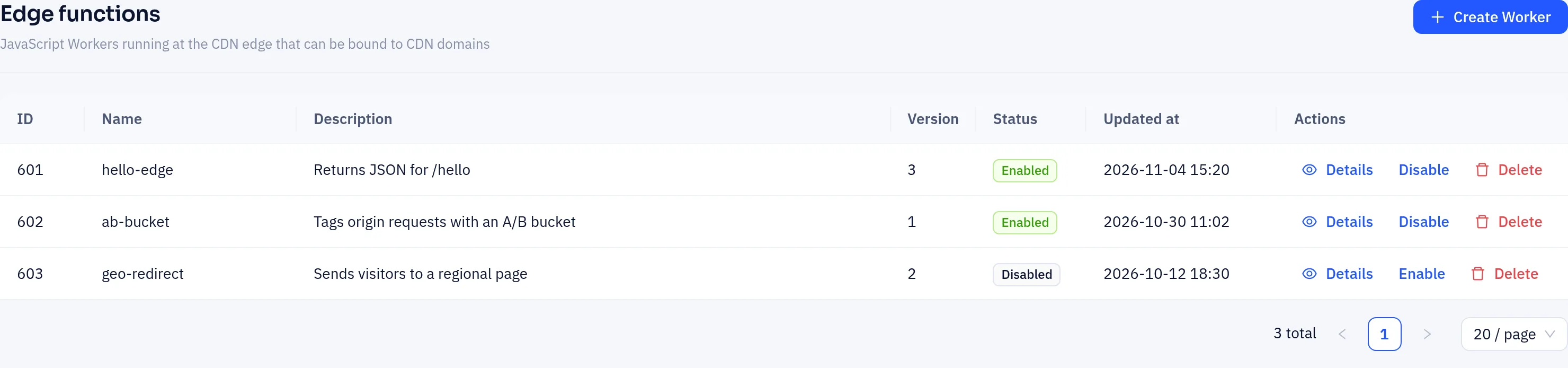
| Workers list | Sidebar CDN → Edge functions | View, create, enable/disable and delete Workers |
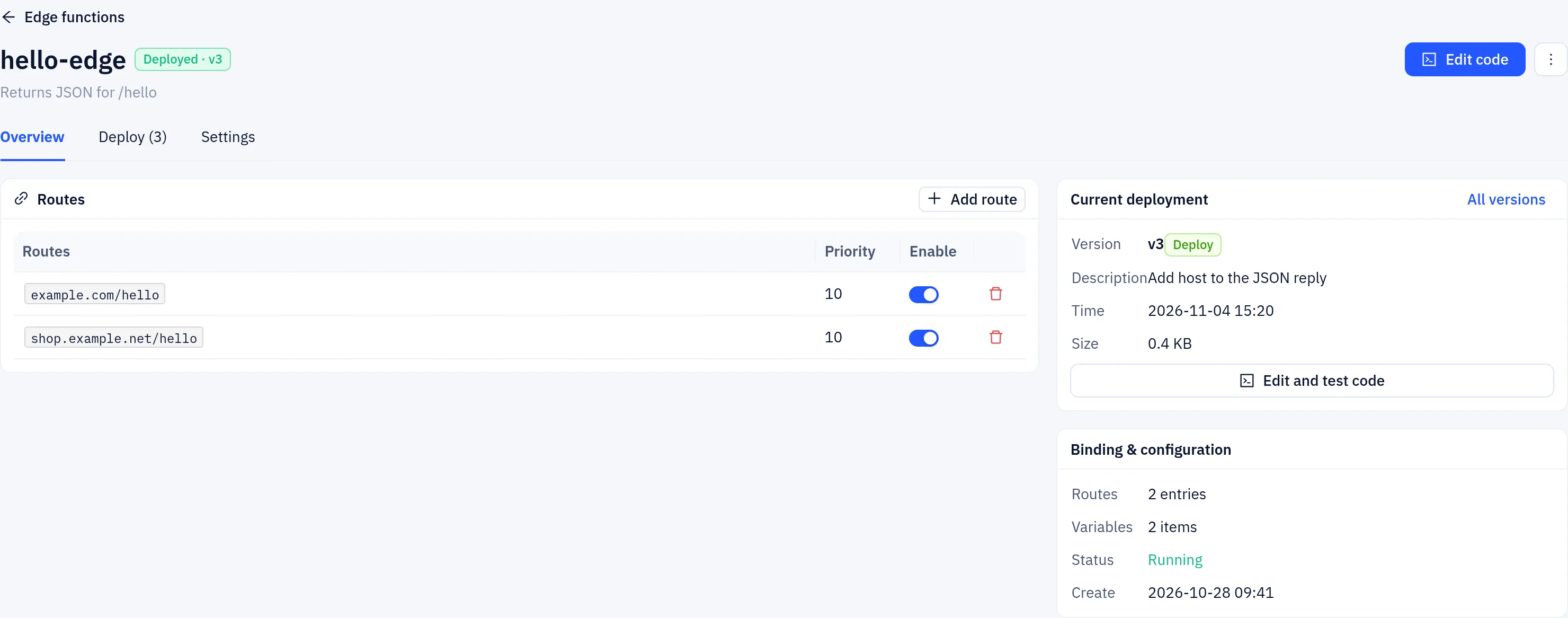
| Worker page | Click Details in the list | Routes, the current deployment, versions, settings, and variables and secrets |
| Code editor | Edit code on the Worker page | Edit and test code, then deploy a new version |
| Domain Worker bindings | CDN → CDN domains → open a domain → Worker | Bind Workers to route patterns on that domain |
Quickstart
Step 1: Create a Worker
Go to CDN → Edge functions and click Create Worker in the top-right corner.
Under 1. Select a template, pick a starting point. Templates include a blank Worker, custom response, redirect, request and response header rewrites, auth token, crypto toolbox, fetch passthrough and an A/B test cookie.
Under 2. Name and deploy, enter a Worker name (lowercase letters, numbers and
-, up to 63 characters) and click Deploy.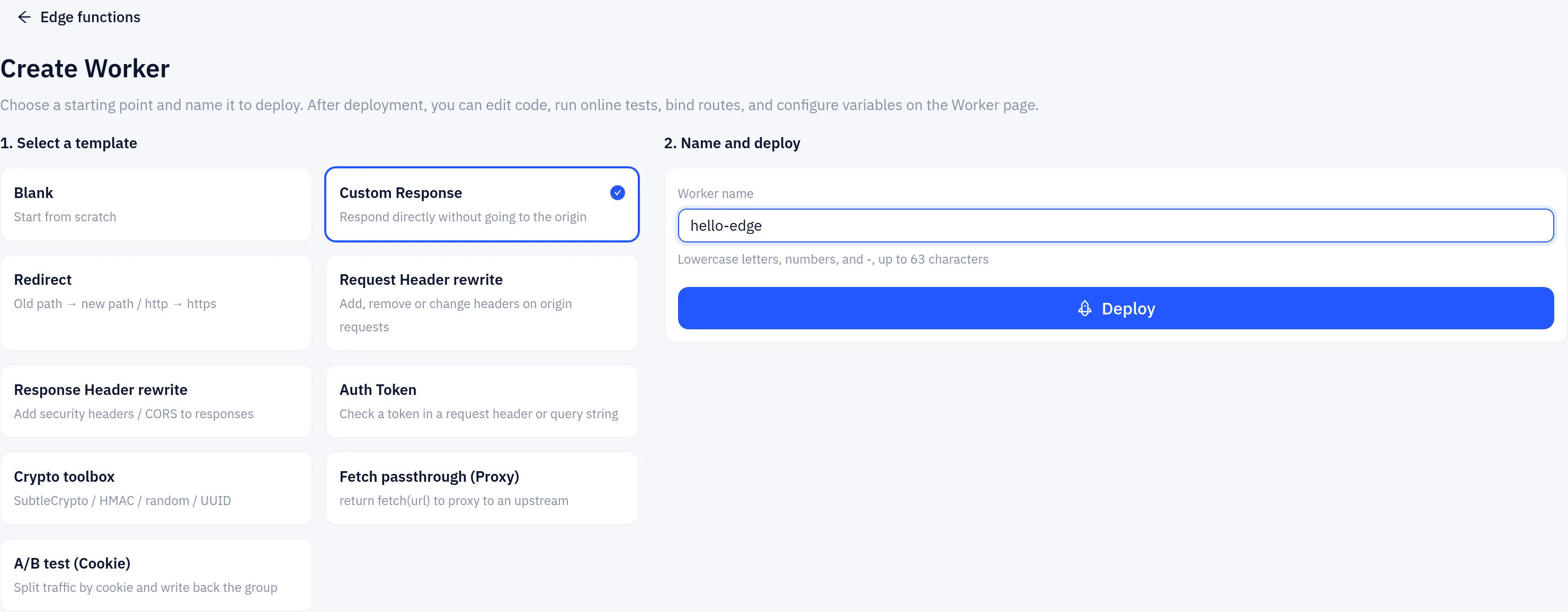
The Worker page opens. Each deployment creates a new version; the Deploy tab lists them and lets you roll back to an earlier one.
Step 2: Write the code
Click Edit code and replace the code with this minimal example. It returns JSON from the edge for /hello; every other path goes to the origin as usual.
export default {
  async fetch(request, env, ctx) {
    // request.url may be "/hello?x=1" or a full URL, so extract the path
    const path = request.url.replace(/^https?:\/\/[^\/]+/, "").split("?")[0];

    if (path === "/hello") {
      return Response.json({
        message: "Hello from the edge",
        host: request.headers.get("host"),
        method: request.method,
      });
    }

    // Not handled here: pass through to the origin
    return { action: "continue" };
  },
};
After editing, click Send in the test panel to run the code against a sample request. The test uses the same runtime, variables and limits as the edge, and the Console tab shows console.log() output. When it works, click Deploy.
Step 3: Bind it to a domain
On the Worker page, click Add route and enter a hostname plus path, for example www.example.com/hello. * matches any characters; with no path, the route covers every path on that hostname.
You can also bind from the domain:
- Go to CDN → CDN domains, open the domain and select Worker.
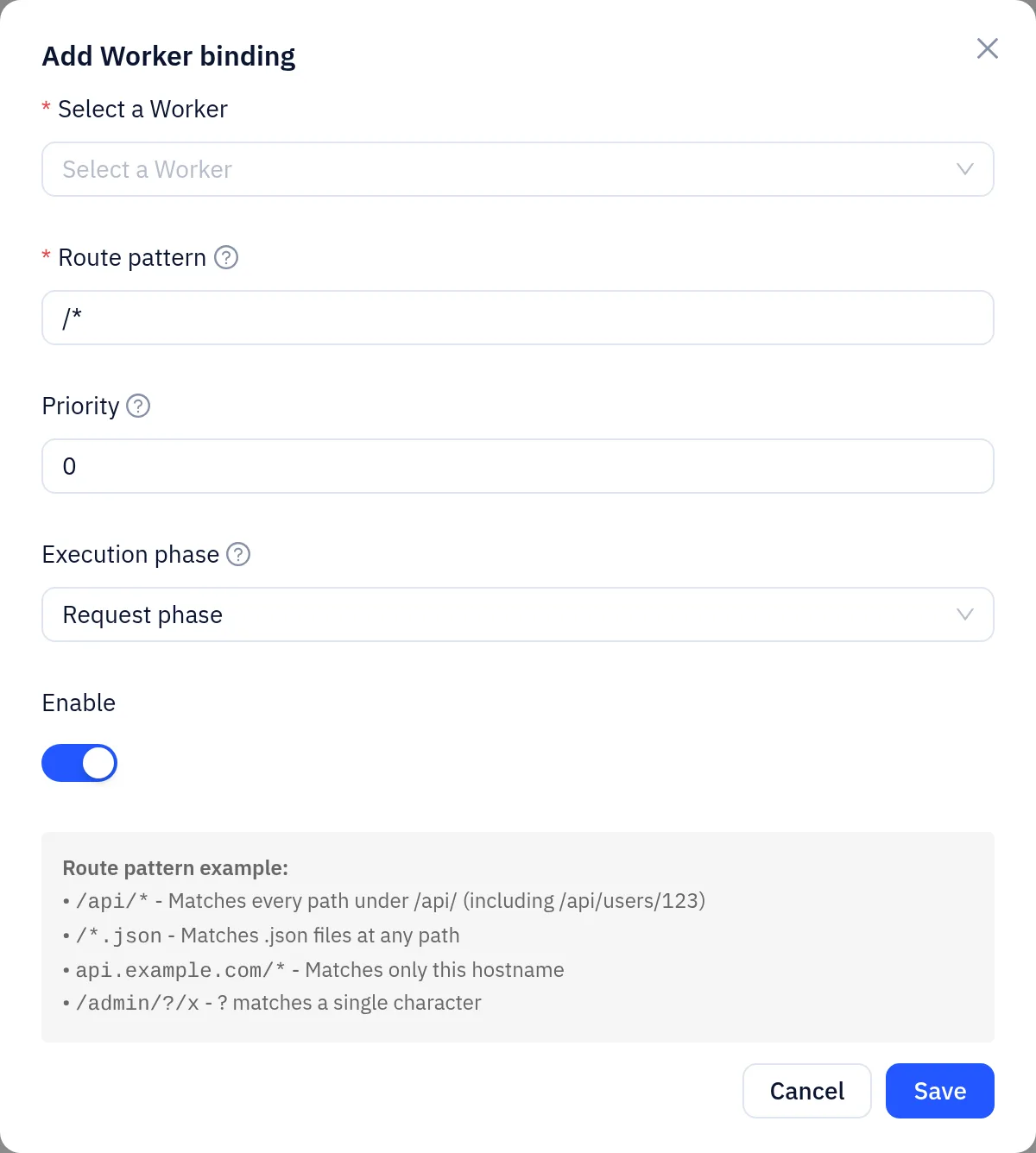
- Click Add binding. In the dialog:
- Select a Worker: choose the Worker you just created. Only enabled Workers are listed.
- Route pattern: for example
/hello, or/*for all paths. The rules are explained below. - Priority: 0–999. Higher numbers win.
- Execution phase: Request phase runs before the origin is contacted. Response phase runs after the origin responds and can change the response status and headers.
- Enable: leave it on.
- Click Save. The configuration is pushed to the edge automatically and normally takes effect within seconds.
Step 4: Test
curl -i https://www.example.com/helloA 200 with the JSON above means the Worker is live. Other paths should behave exactly as they did before you added the binding.
Programming interface
Entry point
The recommended form is export default { fetch(request, env, ctx) { ... } }. fetch can be a regular or an async function. The platform also accepts export default function (request) {} and a global function handler(request) {}.
The request object
| Member | Description |
|---|---|
request.method | Request method, e.g. GET |
request.url | The request URL. Extract the path as in the example so your code works whether or not it includes the scheme and host |
request.headers.get(name) | Read a request header. Names are case-insensitive. Returns null if absent. has() is also available |
Workers cannot currently read the request body. request.text() and request.json() return empty content at the edge. Do not rely on the body.
Return values
| Return | Effect |
|---|---|
new Response(body, { status, headers }) | Sent to the client as-is; the origin is not contacted |
Response.json(data, init) | JSON response with content-type: application/json set automatically |
Response.redirect(url, status) | Redirect, 302 by default |
{ action: "continue" } or no return value | Pass through unchanged |
{ action: "rewrite", headers: {...} } | Add or overwrite these headers on the origin request, then continue. You can also pass method and url (new path and query string) |
For example, this Worker tags origin requests with an A/B bucket:
export default {
  fetch(request) {
    const cookie = request.headers.get("cookie") || "";
    const m = /ab_bucket=(A|B)/.exec(cookie);
    const bucket = m ? m[1] : (Math.random() < 0.5 ? "A" : "B");
    return { action: "rewrite", headers: { "x-ab-bucket": bucket } };
  },
};{ action: "continue" } can also carry headers (set on the origin request), remove_headers (a list of request header names to remove) and response_headers (added to the response sent to the visitor).
Available globals
fetch(url, init): makes a subrequest to a public HTTP/HTTPS address and returnsPromise<Response>withstatus,ok,headers,text()andjson(). You canreturn fetch(url)to send the result straight to the client.Headers,Request,Response,TextEncoder/TextDecoder,btoa/atob.crypto.subtle.digest,crypto.subtle.importKey/sign/verify(HMAC),crypto.getRandomValues,crypto.randomUUID, and the helperscrypto.md5(),crypto.sha1(),crypto.sha256()andcrypto.hmac(), which return hex strings.
Subrequest restrictions:
- Only
http/httpsto ports 80 and 443. - Private, loopback and link-local addresses are always refused.
- At most 3 redirects are followed. Each subrequest times out after 10 seconds, and response bodies are capped at 8 MiB.
Bodies are handled as text. Workers suit text, HTML and JSON. They are not suitable for generating or proxying binary content such as images.
Route patterns
A route pattern is matched against the request path, without the query string. It must match the whole path. A pattern that starts with / matches paths on the bound domain only; a pattern can also start with a hostname, such as api.example.com/* or *.example.com/api/*.
*matches any sequence of characters, including/, so it spans multiple directory levels.**behaves the same as*.?matches a single character.- An empty pattern,
*or/*matches every path.
| Pattern | Matches | Does not match |
|---|---|---|
/hello | /hello | /hello/, /hello/a |
/api/* | /api/, /api/users, /api/users/123 | /api |
/*.json | /data.json, /a/b/c.json | /data.json5 |
At most one Worker runs per request and phase. If several bindings match, only the one with the highest priority runs; on a tie the newer one wins. Give overlapping bindings different priorities.
Resource limits
| Item | Limit |
|---|---|
| Code size | 3 MB (larger code fails to save) |
| Compute time per execution | 5 seconds (time spent waiting on fetch is not counted) |
Total fetch wait time per execution | 15 seconds |
| Memory | Design to stay within 10 MB |
| Subrequests | Design for at most 10 per execution |
| Stack size | 256 KB |
| Response returned by a Worker | 8 MiB |
Errors and debugging
When a Worker throws, has a syntax error, times out or exceeds a limit, the platform fails open. The request continues to the origin as if no Worker were bound, and no error page is shown. If you don't get the result you expect, first check that your code runs correctly.
Use Send in the code editor to test before you deploy. It shows the response, the origin request changes and console.log() output. Output from live traffic is not collected.
Enabling, disabling and deleting
- When you Disable a Worker in the Workers list, it stops running on every domain. You can also disable a single binding on a domain's Worker tab.
- Deleting a Worker stops it on every domain it was bound to.
- When you save new code, every domain bound to that Worker is updated automatically.
Plans and quotas
The number of Worker routes (bindings) per domain depends on the CDN plan linked to that domain. At the time of writing, the Starter, Pro, Multi-site and Enterprise plans each allow 5 per domain. See the Plans page for current values. When you reach the limit, the console shows a "Worker route limit reached" notice. To add more, upgrade your plan or delete existing bindings.
Managing Workers via the API
Every console action maps to a user API call. Authenticate with your login token in an Authorization: Bearer <token> header:
# Create a Worker (include an "id" field to update an existing one)
curl -X POST https://api.yeap.cloud/api/user/cdn/workers/save \
  -H "Authorization: Bearer <token>" -H "Content-Type: application/json" \
  -d '{"name":"hello","code":"export default { fetch(){ return new Response(\"hi\"); } };","enabled":true}'

# Bind it to a domain
curl -X POST https://api.yeap.cloud/api/user/cdn/domains/www.example.com/workers/save \
  -H "Authorization: Bearer <token>" -H "Content-Type: application/json" \
  -d '{"worker_id":123,"route_pattern":"/hello","priority":10,"enabled":true}'
Other endpoints:
- Workers:
GET /api/user/cdn/workers(list),GET /api/user/cdn/workers/detail?id=(details, including code),POST /api/user/cdn/workers/toggle, andDELETE /api/user/cdn/workers/delete(JSON body{"id":...}). - Domain bindings:
GET /api/user/cdn/domains/<domain>/workers,POST .../workers/toggleandDELETE .../workers/delete.
Variables and secrets
On the Worker page, open Settings → Variables and secrets to add plain-text variables or secret keys. Read them in your code as env.NAME, for example fetch(request, env) { env.API_TOKEN }. A saved secret is no longer shown and does not appear in the code or version history. Click Save and deploy variables to push changes to the edge.
Not currently supported
- Reading the request body.
- Changing the response body in the response phase. The response phase can change the status and headers only.
- Background work passed to
ctx.waitUntil(), which is not guaranteed to run after the response is sent. - Execution logs from live traffic.