Page rules
Override caching, rate limiting, response headers, origin SSL and redirects for URLs that match your conditions.
Page rules let you handle URLs that meet certain conditions in a different way. For example, you can cache static assets for longer, turn off caching for an admin area, or redirect an old path to a new address.
Go to CDN → CDN domains, open a domain, then select Page rules.
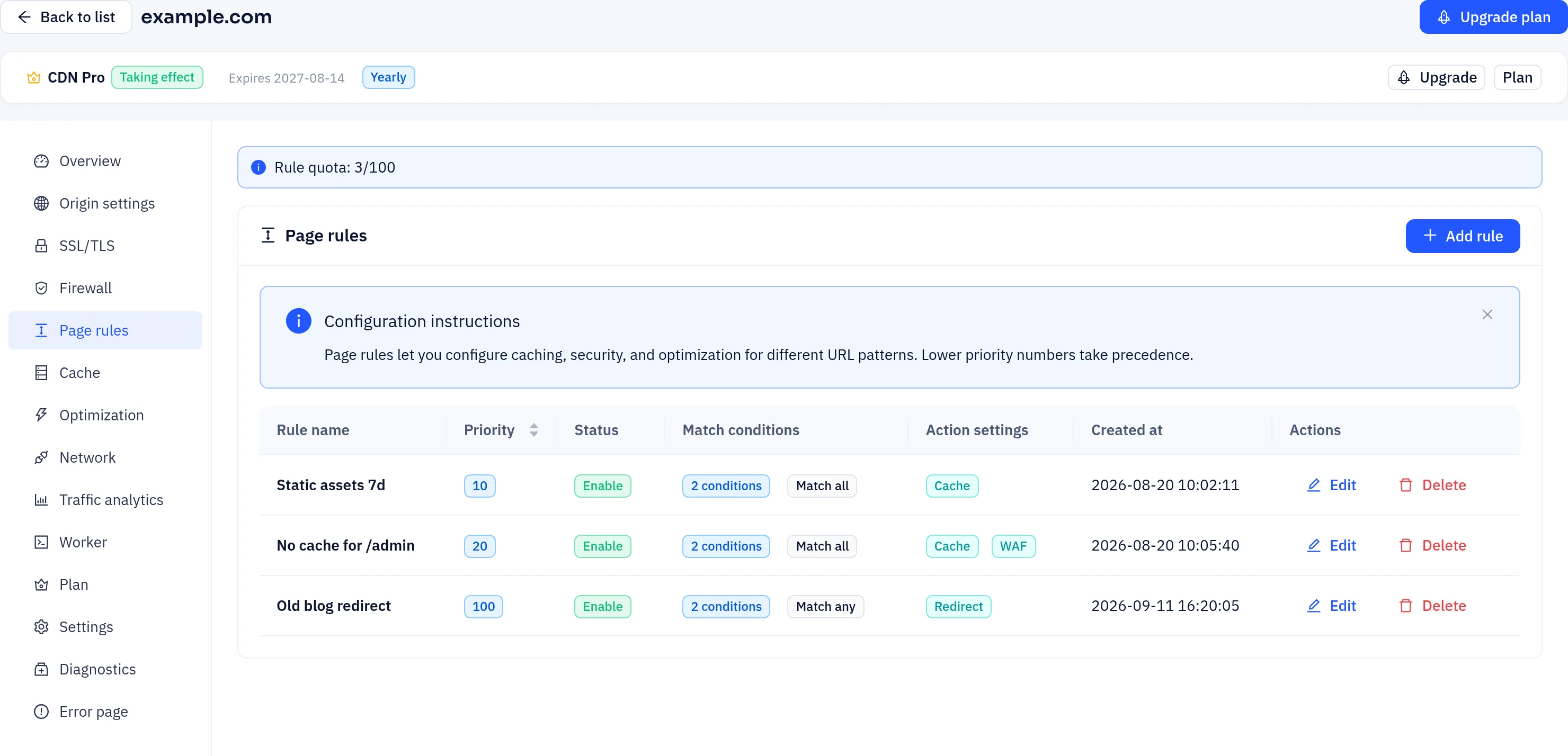
What a rule contains
| Field | Description |
|---|---|
| Name | A label to help you identify the rule, such as "Static asset caching" |
| Priority | From 1 to 999. The default is 100 |
| Enabled | A disabled rule is kept but not applied |
| Conditions | One or more conditions, joined by Match all (AND) or Match any (OR) |
| Actions | One or more actions to apply when a request matches |
Matching URLs
Page rules use the same condition engine as firewall rules. These fields and operators are the ones most often used to describe URLs:
| Field | Example |
|---|---|
| Path / URI Path | starts with /static/; regex ^/blog/\d+ |
| File Extension | in list jpg, png, css, js |
| Host | equals img.example.com (useful when a domain has several hostnames) |
| Query String | parameter name utm_source, operator exists |
| Header / Cookie | give the name, then match its value |
| Is HTTPS, HTTP Method, Client IP, Country Code, ASN, User Agent, Referer | narrow the match by request attributes |
The available operators are equals, not equals, contains, does not contain, starts with, ends with, regex, in list, not in list, greater/less than (or equal), exists and does not exist.
Path matching is case-sensitive. To match a directory, use starts with. It's clearer than a regex and easier to get right.
Actions
Under Action, the panels are grouped like this:
| Group | Panels |
|---|---|
| Cache & delivery | Cache, Browser cache, Optimization, Network |
| Security | WAF, Rate limiting, Block, Challenge, Allow, Signed URL, CORS, Security headers |
| Origin | Origin override, Rewrite, Origin request headers, SSL/TLS, Origin shield |
| Response | Custom headers, Redirect |
The ones used most often:
| Action panel | What it does |
|---|---|
| Cache | Cache mode (Automatic, Force caching or Do not cache content) and the cache time for matching URLs. Advanced overrides query string handling, the cache host mode, extra variants and serving stale cache. Responses that can't be cached, such as those with Set-Cookie or no-store, still aren't cached |
| Browser cache | The browser cache lifetime for matching URLs |
| Rate limiting | Requests over the limit get 429. To rate-limit by header or cookie, use a firewall rule instead |
| WAF | Turns WAF inspection off for matching requests, which is useful for trusted callback URLs |
| Origin override | Sends matching requests to a different origin, Host or protocol |
| Rewrite | Changes the path sent to the origin. The visitor's URL stays the same |
| Origin request headers | Sets or removes request headers sent to the origin |
| SSL/TLS | Changes the SSL mode used to connect to the origin for these URLs. With Force HTTPS on, HTTP requests get a 301 redirect to the same URL over HTTPS |
| Custom headers | Adds or replaces HTTP response headers |
| Redirect | Responds with a redirect to a fixed target URL (301, 302, 307 or 308) without contacting the origin |
Settings you leave on Follow domain use the site's own Cache, Optimization and Network settings. Options your plan doesn't include show an upgrade tag.
Create a rule
- On Page rules, click Add rule.
- Enter a name, change the priority if you need to, and leave Enabled on.
- Under Match conditions, add your conditions and choose Match all (AND) or Match any (OR).
- Under Action, click Enable on each action panel you want and fill in its settings. Click Remove to drop a panel.
- Click OK to save. The rule takes effect at the edge within seconds to a minute.
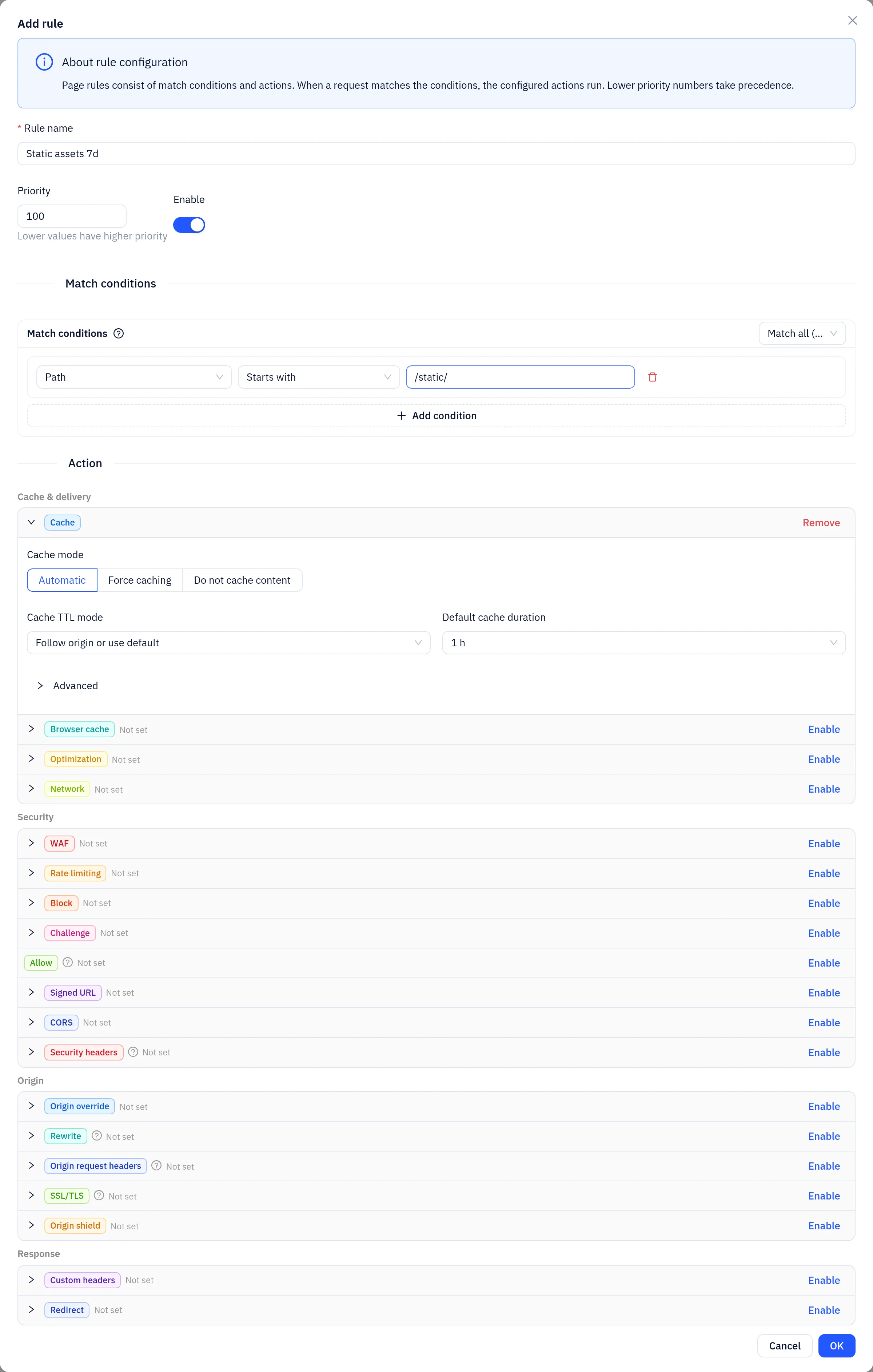
You can't save a rule unless it has at least one condition and one action.
Example: cache static assets for 7 days
- Condition: File Extension in list
jpg,png,css,js - Action: Cache, cache time
604800
Example: don't cache the admin area
- Condition: Path starts with
/admin - Action: Cache, mode Do not cache content
When several rules match
A request can match more than one page rule, and the actions of every matching rule are applied together. A redirect or Force HTTPS ends processing immediately, so no further rules run.
Don't give the same URLs conflicting values in different rules, such as two different cache times. Keep conditions from overlapping, or combine those rules into one.
Rule quota
Your plan may limit how many page rules you can create. If it does, a banner at the top of the page shows your usage, such as "Rule quota: 3/5". When you reach the limit, delete rules you no longer need or upgrade your plan.
API
The page rule endpoints are under /api/user/cdn/rules:
curl -X POST "https://api.yeap.cloud/api/user/cdn/rules/create" \
  -H "Authorization: Bearer <token>" \
  -H "Content-Type: application/json" \
  -d '{
    "domain_id": 123,
    "name": "Static assets 7d",
    "priority": 100,
    "enabled": true,
    "settings": {
      "matcher": {"op": "and", "conditions": [
        {"collection": "EXTENSION", "op": "in", "var": ["jpg", "png", "css", "js"]}
      ]},
      "action": {"cache": {"enabled": "on", "ttl": 604800}}
    }
  }'
Other endpoints:
- List rules:
GET /api/user/cdn/rules?domain_id=123 - Update a rule:
POST /api/user/cdn/rules/update, withidin the body - Delete a rule:
DELETE /api/user/cdn/rules/delete?id=<id>