CDN overview
What Yeap Cloud CDN does, plan quotas, the tabs on a site detail page, and protocol support.
What the CDN does
Once a site is on Yeap Cloud CDN, visitor requests arrive at a nearby edge node first. The edge either answers from cache or fetches the content from your server (the origin):
- Caching: static assets are cached at the edge according to your rules. Cache hits never reach your origin, which cuts latency and origin bandwidth. See Cache and purge.
- HTTPS termination: each hostname can get a free Let's Encrypt certificate or use your own, with Force HTTPS and HSTS available. See SSL/TLS.
- Security: the WAF, custom firewall rules, hotlink protection, and country and user-agent access control all run before a request reaches your origin. See WAF and security.
- Origin control: one site can have several hostnames, and each hostname has its own origin addresses. Requests can be spread across those addresses by round robin or by visitor-IP hash. See Add a site.
- Per-URL behavior: page rules override caching, redirects, origin selection and more for specific paths. See Page rules.
Plans and quotas
Every CDN site (domain) is bound to a CDN plan subscription. The add-domain wizard creates that subscription when you pick a plan. A Multi-site plan covers up to 5 sites; the other plans cover one. To view or upgrade plans, click Upgrade plan on a site's page.
At the time of writing, the plans include these main quotas. The Plans page always has the current figures.
| Free | Starter | Pro | Multi-site | Enterprise | |
|---|---|---|---|---|---|
| Sites per plan | 1 | 1 | 1 | 5 | 1 |
| Monthly traffic | 10 GB | 100 GB | 1000 GB | 3 TB | 5 TB |
| Monthly requests | 1 million | Unlimited | Unlimited | Unlimited | Unlimited |
| Hostnames per site | 30 | 100 | 1,000 | 2,000 | Unlimited |
| Page rules per site | 10 | 20 | 100 | 100 | Unlimited |
| WAF | Basic | Basic | Full | Full | Full |
Customize or remove the Server response header | — | — | ✓ | ✓ | ✓ |
- Paid plans are billed monthly, quarterly, semi-annually or annually. The cycles on offer vary by plan. See the Plans page for prices.
- Hostname and page-rule quotas are checked when you create an item. If you are at the limit, the request is rejected and the console suggests an upgrade.
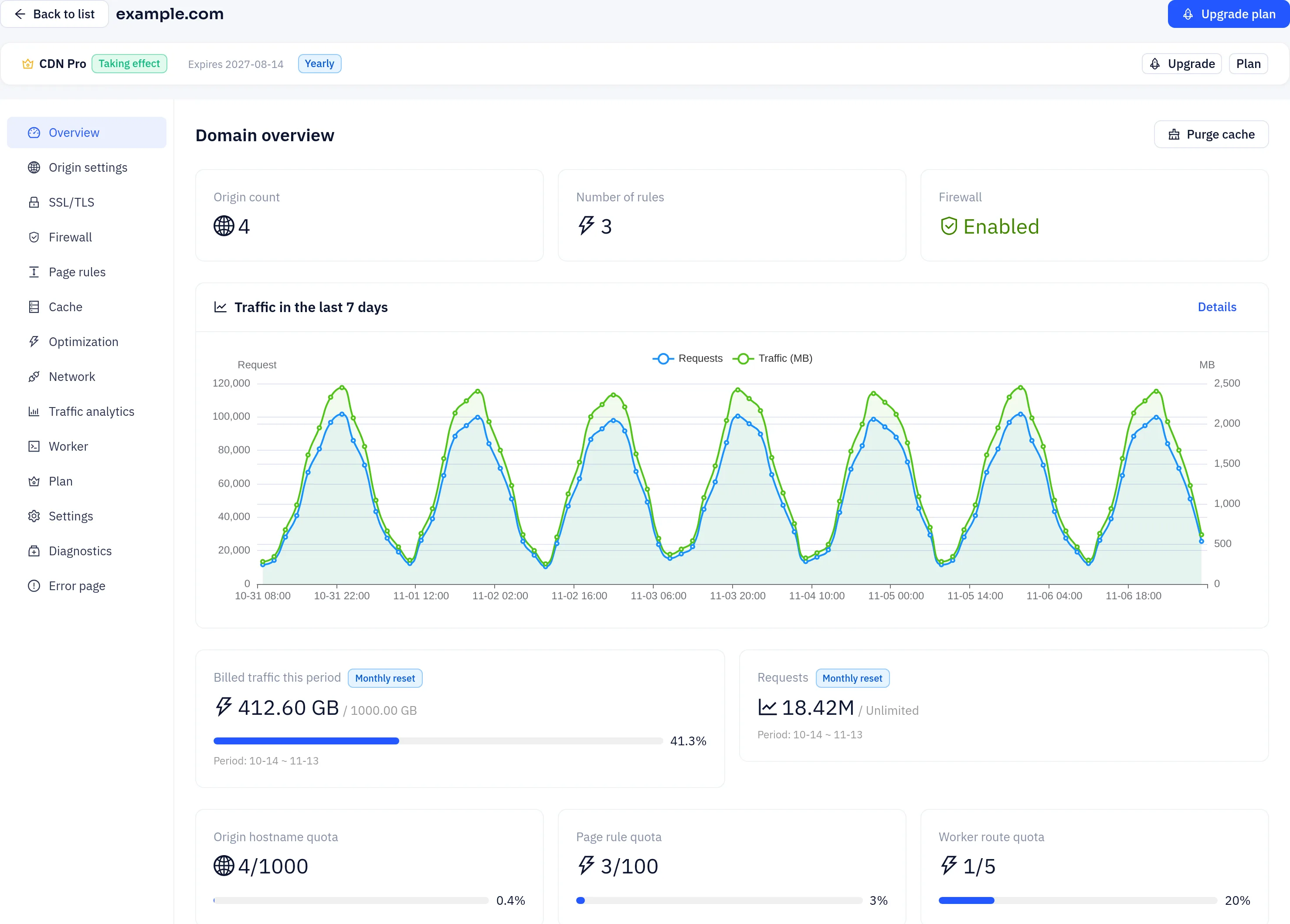
- To see current usage, open the Overview page of a site. It shows traffic this period, the hostname quota, page-rule quota and similar counters.
You must pay for a paid plan first. The site only becomes Active once its subscription is in effect.
The site detail page
Click a domain in the CDN domains list to open its detail page. The menu on the left has these pages:
| Page | Purpose |
|---|---|
| Overview | Site status, number of origins and rules, firewall status, quota usage, and an origin summary for each hostname |
| Origin settings | Add, edit or remove hostnames and set their origin addresses, origin protocol and load-balancing mode |
| SSL/TLS | Encryption mode, Force HTTPS, HSTS and security headers, edge certificates for each hostname, Origin CA certificates |
| Firewall | WAF, custom firewall rules and access control. See WAF and security |
| Page rules | URL-based overrides. See Page rules |
| Cache | Edge cache, browser cache, cache key, negative caching, origin protection, and Purge cache |
| Optimization | Gzip transfer compression, HTML/CSS/JavaScript minification, WebP conversion, charset, HTTP/3 |
| Network | Origin HTTP version, proxy timeout, keep-alive, maximum request body size |
| Traffic analytics | Traffic and request statistics. See Logs and analytics |
| Worker | Bind Workers to routes on this site. See Workers |
| Plan | The site's plan, usage and add-ons |
| Settings | Basic site information and deleting the site |
| Diagnostics | One-click checks for DNS resolution, origin reachability, origin redirects, SSL mode consistency, the origin certificate, Force HTTPS and mixed-content risk |
| Error page | Custom error pages for specific HTTP status codes |
Protocol support
- Visitor to edge: HTTP/1.1 and HTTP/2. HTTP/2 is negotiated automatically on HTTPS connections.
- HTTP/3 (QUIC): on by default. The edge advertises HTTP/3 to browsers that support it, and they switch to it when it is available. You can turn it off under Optimization → Protocol optimization. Other clients keep using HTTP/2 or HTTP/1.1, so access is never affected.
- Edge to origin: HTTP/1.1. For HTTPS origins you can choose HTTP/2 with the HTTP version setting on the Network tab.
Checking that traffic goes through the CDN
Once the site is live, look at the response headers with curl -I:
curl -sI https://www.example.com/logo.pngWhen edge caching is enabled for the site, responses to GET and HEAD requests include an X-Cache-Status header. Possible values:
HIT: served from the edge cacheMISS: fetched from your originEXPIRED: the cached copy had expired and was refetchedBYPASS: caching was skipped because of a rule