Domain service overview
What Yeap Cloud Domain Registration offers: search, registration, transfer-in, management and security features.
Yeap Cloud Domain Registration registers and manages domain names for you through our upstream registrar partners. Domains are held under your Yeap Cloud account, all charges go through your regular invoices, and domains plug directly into Yeap DNS and Yeap CDN.
Where to find it
| Menu | Purpose |
|---|---|
| Domains → Register a domain | Check availability and prices, add domains to the cart |
| Domains → My domains | Manage every domain in your account |
| Domains → Domain transfer | Move domains in from another registrar |
| Domains → Domain contacts | Address book of owner and contact details |
Key features
Domain search
The Register a domain page has three tabs:
- Search: enter a name such as
exampleor a full domain such asexample.com. The results list every extension on sale, popular ones first, and load more as you scroll. Use the filter button to narrow the extensions, and Show available domains only to hide taken names. Names in non-Latin scripts are checked only against extensions that support that script. - Bulk lookup: check up to 100 names at once, one per line. Names without an extension are checked with the extensions you pick under Suffix. You can select the available ones and add them to the cart together, or Export the results as CSV.
- Price list: registration, renewal and transfer prices for every extension.
Each result shows whether the domain is available, its first-year price and its renewal price. If a domain is already registered and it is yours, click Transfer in to move it to Yeap Cloud.
Registration and transfer-in
- Registration periods from 1 to 10 years, depending on the extension.
- A transfer needs the transfer code (EPP / Auth code) from your current registrar for most extensions.
- Domains go through the cart. At checkout you confirm the owner contact, DNS, auto-renewal and privacy for all domains in one dialog.
- The request is sent to the registry only after the invoice is paid. Processing is automatic, and failed attempts are retried automatically.
See Register, transfer and renew for the steps.
My domains
The My domains list can be searched by name and filtered by status, for example expiring within 30 days. A warning at the top shows how many domains expire soon.
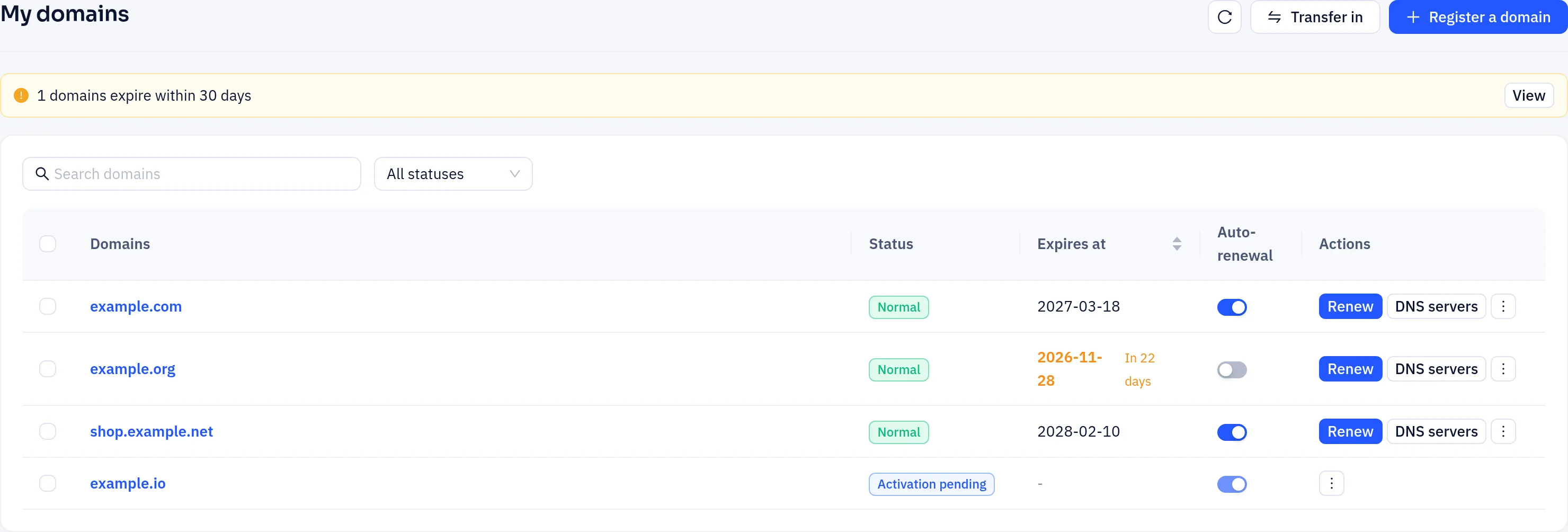
For each domain you can:
- Renew it, or select several domains and click Bulk renewal
- Turn Auto-renewal on or off
- Change its DNS servers
- From the ⋮ menu: open Details, DNS records or Contacts, Lock or Unlock the domain, and Get transfer code
Click a domain to open its detail page, with the tabs Overview, DNS servers, Contacts, Security and Child nameservers. Sync at the top re-reads the expiry date and status from the registrar.
Contacts
Domain contacts is an address book: name, organization, email, phone, address, city, province/state, postal code and country. You can mark one entry as default and copy entries. Some extensions (for example .us, .cn, .uk) need extra details; click Extension info on an entry to store them per extension, and they are filled in automatically at checkout.
The contact you pick is copied to the domain. Later edits in the address book don't change registered domains. To change a domain's contacts, use the Contacts tab on its detail page.
Security and privacy
On the domain's Security tab:
- Domain lock: blocks transfers to another registrar while it is on.
- Privacy protection: where the extension supports it, hides your personal details in public WHOIS. It is on by default at checkout. If the extension does not support it, the tab says so and the switch is disabled.
- Transfer code: click Get to retrieve the code for moving the domain to another provider. Unlock the domain first.
DNSSEC and child nameservers
Where the extension supports it, the DNS servers tab has a DNSSEC card: it shows the DS records at the registry, lets you sync the DS record from Yeap DNS, or add one manually. The Child nameservers tab lets you add IPv4/IPv6 addresses for your own nameservers under the domain (such as ns1.example.com).
Availability depends on the extension
Extensions and registrars differ in what they support. If an action is unavailable in the console or fails when you submit it, the extension usually does not support it.
Expiry
During the 30 days before expiry, the detail page shows a reminder with a Renew button. After expiry a domain moves through a grace period, a redemption period and a pending-delete stage. How long each lasts depends on the extension.
- Once the domain expires, the Yeap DNS zone that was created automatically with the registration stops answering queries. When the domain reaches pending delete, that zone is deleted. DNS zones you created separately are not affected.
- If the domain is in its redemption period and can be restored, a Restore button appears in My domains and on the detail page. The redemption fee is deducted from your balance. If the domain can only be restored by our support team, the page says so; open a ticket.
Renew before the expiry date, or turn on auto-renewal and keep enough account balance.