Shared Hosting
Virtual hosting for PHP websites, with web space, a MySQL database, multiple domains and SSL certificate support.
Shared Hosting (virtual hosting) is for hosting PHP websites such as company sites, blogs and small business applications. Each hosting account includes web space, one MySQL database and a monthly traffic allowance. You can bind several domains to it and deploy an SSL certificate. Limits such as the number of cron jobs are enforced by the hosting server, and you'll see a message if you reach one.
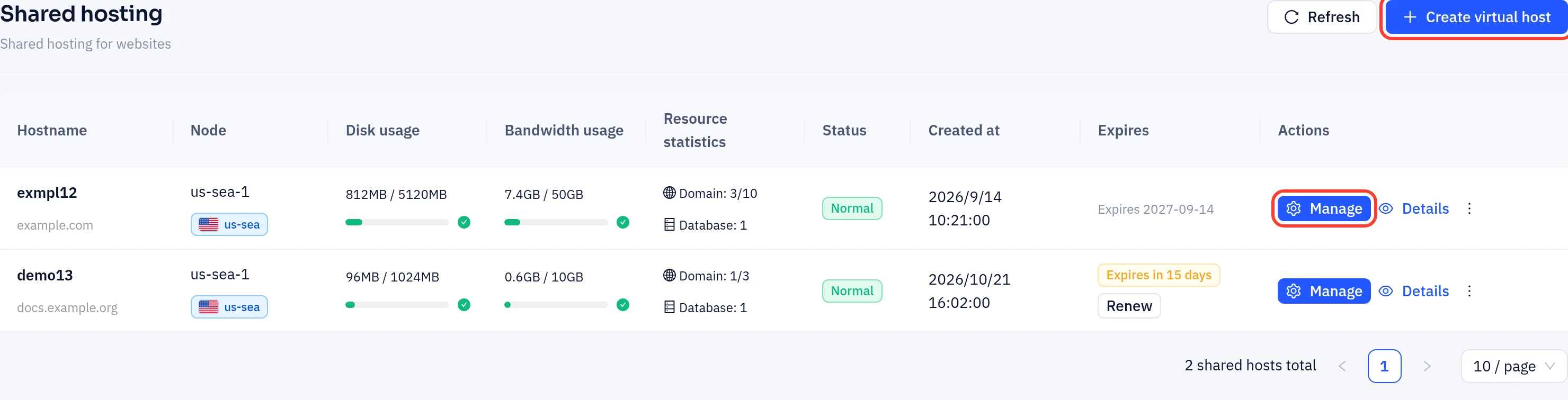
In the left-hand menu of the console, open Shared hosting → Hosting accounts. Click Manage on a hosting account to open its management page.
Plans
At the time of writing the following plans are offered (see the purchase page for current details):
| Plan | Web space | MySQL database | Monthly traffic | Domains |
|---|---|---|---|---|
| Shared Hosting Starter | 1 GB | 100 MB | 10 GB | 3 |
| Shared Hosting Pro | 5 GB | 500 MB | 50 GB | 10 |
| Shared Hosting Enterprise | 20 GB | 2 GB | 200 GB | Unlimited |
Every plan supports PHP and SSL certificates.
Getting a hosting account
- On the Shared hosting page, click Create virtual host to open the provisioning wizard.
- Work through Select region → Select plan → Configuration → Confirm. In the Configure step choose a billing cycle and enter the Primary domain and an FTP password of at least 8 characters. To get a site with WordPress already installed, choose WordPress instead of Shared hosting in the plan step.
- Click Add to cart and pay under Billing → Cart.
- Once payment is confirmed, the hosting account and its database are created automatically. The system generates the account name, which is also your database username.
The password you set during provisioning is used for FTP and, at first, for the database. You can change each one later on the FTP account and Manage databases tabs.
When you delete a hosting account, the site stops right away and its files and database are permanently deleted after 7 days.
In this section
- Sites, domains and databases: bind domains, upload site files, connect to the database and set up cron jobs.
- SSL certificates: deploy an HTTPS certificate for the domains on your hosting account.