API access
The console API endpoint, bearer-token authentication, refresh tokens and current limitations.
Overview
The Yeap Cloud console runs on a set of HTTPS JSON APIs. This page explains where that API lives, how to authenticate with an API key or a sign-in token, and the current limits on programmatic access.
There is not yet a versioned public API with stability guarantees for third-party integrations. What follows describes the API the console uses, and endpoints may change as the console evolves. If you need an automated integration, please contact us first.
API endpoint
https://api.yeap.cloud- Authentication endpoints live under
/auth/..., for example/auth/loginand/auth/refresh-token. - Endpoints that require a signed-in user live under
/api/user/..., for example/api/user/profile.
Requests and responses are JSON. Send Content-Type: application/json with request bodies.
Authentication
There are two ways to authenticate:
- API key (recommended for scripts and integrations): a long-lived key you create under Profile → API key.
- Access token: the short-lived token the console gets when you sign in.
API key
- Open Profile from the avatar menu and go to the API key tab.
- Under Generate new key, enter a key name (for example "CI deployment"), choose when it expires (30 days, 90 days, 1 year or never) and click Generate key.
- The key (it starts with
yk_) is shown only once. Copy it and store it somewhere safe, then click I've saved it.
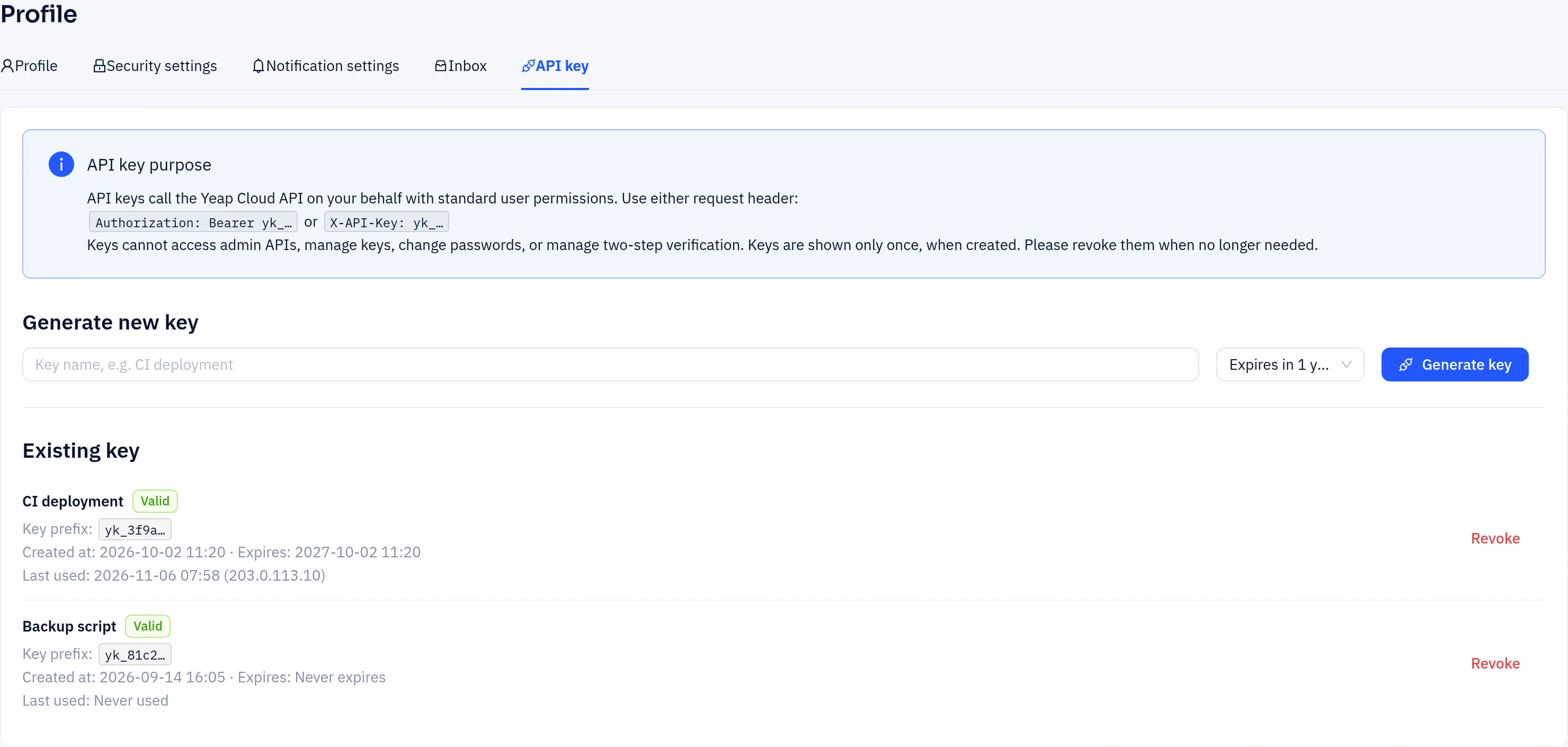
Send the key in either request header:
Authorization: Bearer yk_...
X-API-Key: yk_...
A key acts as you, with normal user permissions. It cannot manage API keys, change your password or email, or manage two-step verification, and it can only read (not change) your profile. Such requests return HTTP 403.
The Existing key list shows each key's name, status, key prefix, creation and expiry time, and when and from which IP it was last used. Click Revoke to disable a key you no longer need; programs using it stop working immediately.
Access token
When you sign in to the console, the server issues an access token (a JWT). To call endpoints under /api/user/..., send it in the request header:
Authorization: Bearer <access-token>- Access tokens are valid for about 24 hours.
- If the token is missing, invalid or expired, the API returns HTTP
401:
{"error": "Unauthorized", "code": 401}- If an account is deactivated, the tokens it was already issued stop working immediately.
- Signing out of the console invalidates the current access token and revokes the account's refresh tokens.
Refresh token
If you tick Remember me when signing in, the server also issues a refresh token that is valid for 14 days. When your access token expires, exchange the refresh token for a new access token instead of signing in again:
curl -X POST https://api.yeap.cloud/auth/refresh-token \
  -H "Content-Type: application/json" \
  -d '{"refresh_token": "<refresh-token>"}'
A successful response looks like this:
{"success": true, "token": "<new-access-token>", "user": { ... }}If the refresh token is invalid or has expired, the response is {"success": false, "error": "Invalid or expired refresh token"} and you need to sign in again. The console handles this refresh for you automatically.
Sign-in requires human verification
Every call to /auth/login must pass a human-verification challenge (the console shows it as a pop-up), and accounts with two-factor authentication must also enter a one-time code. For unattended scripts, use an API key instead of signing in.
Example: read your profile
curl https://api.yeap.cloud/api/user/profile \
  -H "X-API-Key: yk_..."
A successful response looks like this:
{"success": true, "data": {"id": 123, "username": "...", "email": "...", ...}}Most user endpoints return the shape {"success": true, "data": ...}. Errors return {"success": false, "error": "description"}.
Product-specific keys
Some products have their own keys that are separate from the keys on this page, for example LLM API → API tokens and Object Storage → Access keys. See the documentation for each product.
Security recommendations
- API keys and access/refresh tokens are equivalent to being signed in. Don't share them or commit them to source control.
- Give each script its own key with an expiry date, and revoke keys you no longer use.
- If you think a key has leaked, revoke it. If a sign-in token has leaked, sign out of the console and change your password.
- Turn on two-factor authentication for your account.