Install and renew
Download your certificate files, deploy them on Nginx, Apache or the CDN, and renew before expiry.
Once your certificate is issued you need to deploy it on your web server or CDN and renew it before it expires. This page covers the My certificates page, how to get the certificate files, and common ways to deploy them.
The My certificates page
Open SSL certificates → My certificates. The list has these columns:
| Column | Description |
|---|---|
| Domains | Primary domain; multi-domain certificates also show "+N additional domains" |
| Type/brand | Certificate type and brand |
| Status | Payment pending, Setup pending, Verification pending, Verifying, Issued, Expired, Failed; within 30 days of expiry it shows "Expiring soon (N days)" |
| Issued at / Expiration time | Validity of the current certificate; paid certificates also show "Service until" (the end of the term you paid for) |
| Auto-renewal | Renewal switch (see Renewal below) |
| Actions | Manage (or Configuration / Verify while the order is in progress), Download, Delete |
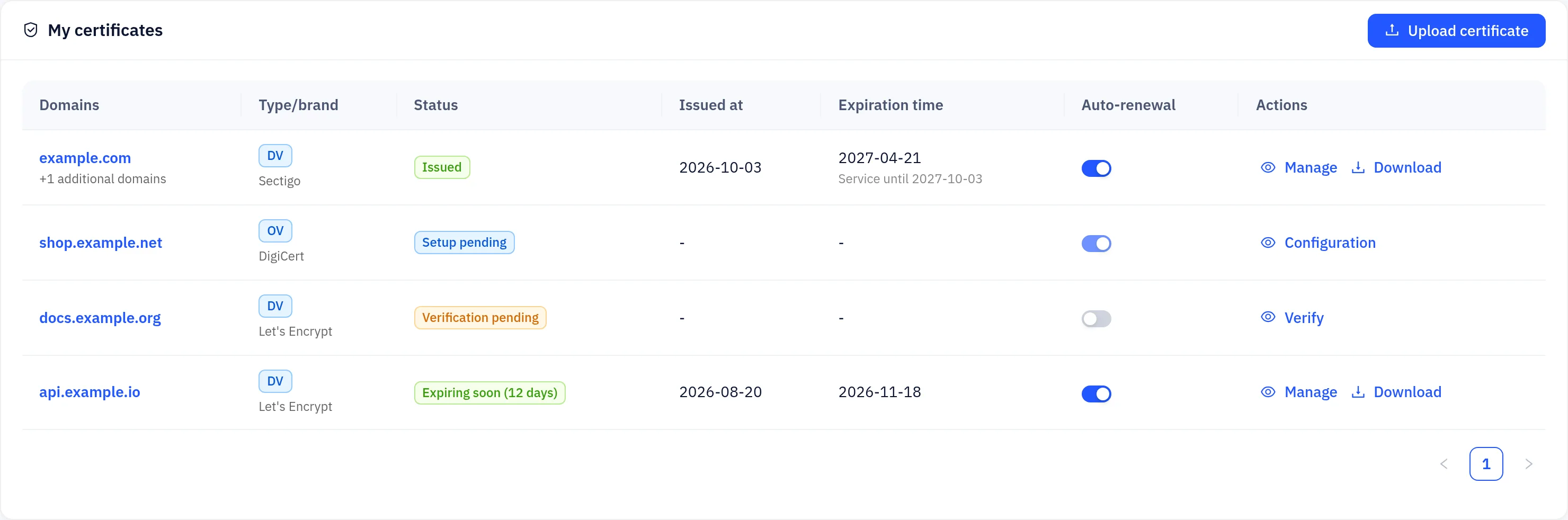
Click a row to open the order page with the product, type, order number, domains, expiry and issuer.
Getting the certificate files
On the order page of an issued certificate, click Download and pick a format:
| Option | Contents |
|---|---|
| All (ZIP: Nginx / Apache / IIS) | Every file below in one archive |
| Certificate + chain (fullchain.pem) | Your certificate followed by the CA intermediates |
| Certificate (.crt) | Your certificate only |
| Certificate chain (CA bundle) | The CA intermediates only |
| Private key (.key) | Only when the platform generated the key |
| PFX (IIS / Windows) | Certificate and key in one file; you choose a password |
| DER | The certificate in binary DER format |
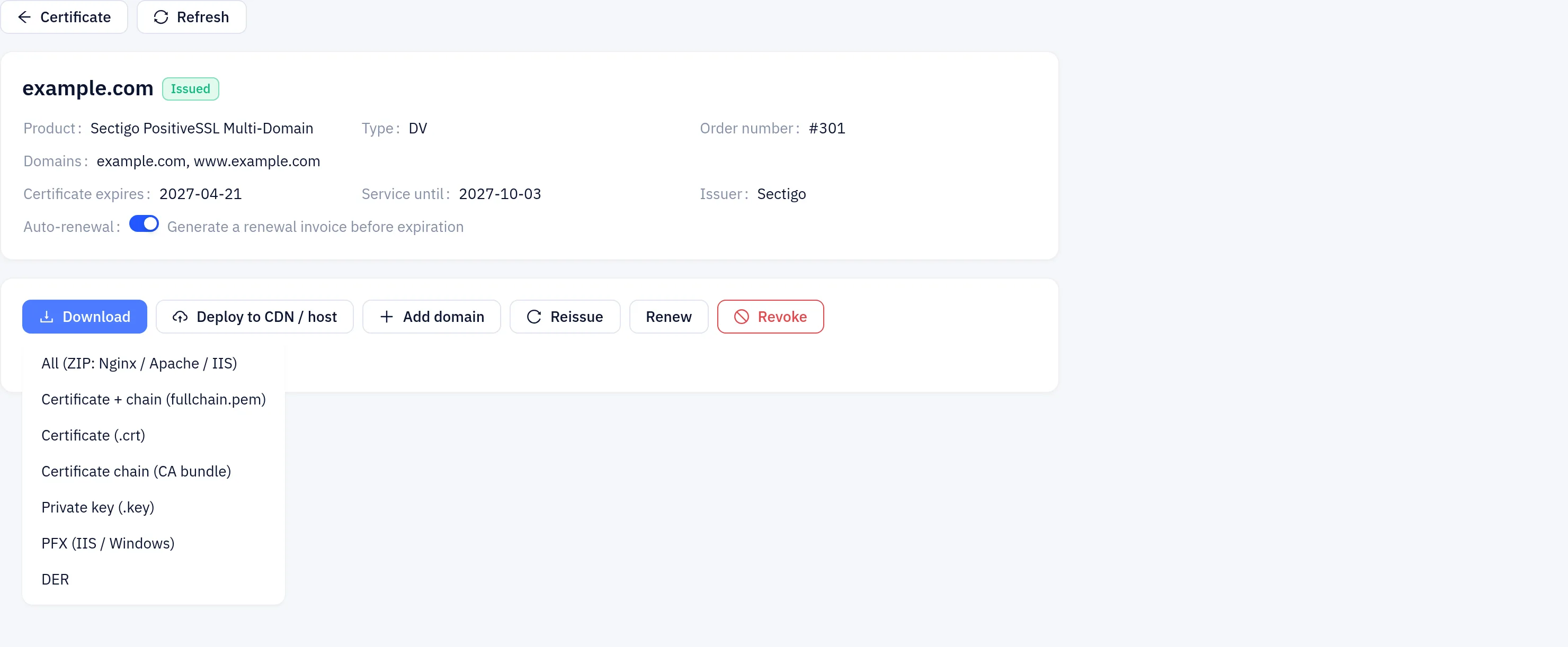
Download in the list saves the full chain (<domain>.fullchain.pem).
A private key is only included when the platform generated the CSR. If you submitted your own CSR, use the private key you saved when you created it.
Deploying on a web server
Most servers expect a full chain: your certificate first, followed by the CA intermediates. Use the fullchain.pem download, or combine the files yourself:
cat example.com.crt example.com-ca-bundle.crt > example.com.fullchain.pemIf you have a certificate without its intermediates, the certificate chain completion tool in SSL tools can build the full chain for you.
Nginx
server {
    listen 443 ssl;
    http2 on;
    server_name example.com;

    ssl_certificate     /etc/ssl/example.com.fullchain.pem;
    ssl_certificate_key /etc/ssl/example.com.key;
    ssl_protocols       TLSv1.2 TLSv1.3;
}
Run nginx -t to check the configuration, then nginx -s reload.
Apache
<VirtualHost *:443>
    ServerName example.com
    SSLEngine on
    SSLCertificateFile    /etc/ssl/example.com.fullchain.pem
    SSLCertificateKeyFile /etc/ssl/example.com.key
</VirtualHost>
Apache 2.4.8 and later accept a full-chain file in SSLCertificateFile.
PFX/PKCS#12 (IIS, Tomcat and others)
Choose PFX (IIS / Windows) in the Download menu, or convert the PEM files locally with OpenSSL:
openssl pkcs12 -export -out example.com.pfx \
-inkey example.com.key -in example.com.crt -certfile example.com-ca-bundle.crtThe private key file should be readable only by the web server process (for example chmod 600). Never commit it to a repository or send it over chat.
Deploying on Yeap Cloud CDN or hosting
If the site is on Yeap Cloud CDN or Yeap Cloud hosting, click Deploy to CDN / host on the order page. The dialog lists the CDN domains and hosts that match the names on the certificate; click Deploy next to each one. After a renewal or reissue, click Redeploy. The CDN can also issue and renew free certificates for your hostnames by itself; see the CDN docs.
Verifying the deployment
openssl s_client -connect example.com:443 -servername example.com </dev/null 2>/dev/null \
  | openssl x509 -noout -subject -issuer -dates
You can also paste the served certificate into the certificate parser in SSL tools to check its validity and SAN names. If the server reports a key mismatch, use the key match tool to confirm the certificate and key belong together.
Renewal
- Free certificates (Let's Encrypt, ZeroSSL) are valid for 90 days. With Auto-renewal on, a new certificate is issued automatically before expiry; if the verification record is not added automatically, the order shows the record to add. You can also click Renew now on the order page.
- Paid certificates are bought for a term of 1 to 3 years. During the term, a new certificate is issued free before the current one expires. With Auto-renewal on, a renewal invoice is created before the term ends ("Service until"); paying it extends the term.
- To renew manually, click Renew on the order page. If payment is needed, a renewal invoice is created and you are taken to it.
Certificates are flagged as expiring soon in their last 30 days. When a new certificate is issued, download it again, replace the old files on your server and reload the service (or click Redeploy for CDN and hosting).
Uploading an existing certificate
If you bought a certificate from another CA, click Upload certificate on the My certificates page and enter the primary domain, the certificate (PEM), the private key (PEM) and optionally the CA bundle. It is then kept under My certificates alongside your other certificates. The platform checks the format and reads the issuer and expiry date automatically.
Deleting a certificate
Click Delete and confirm. Deletion cannot be undone. Uploaded certificates can be deleted at any time; purchased certificates can be deleted only when they are payment pending, failed, cancelled or expired.
Reissue, adding names and revocation
On the order page of an issued certificate:
- Reissue issues a new certificate free within the service term, for example after a key compromise. You can change the verification method, key type or supply a new CSR.
- Add domain (multi-domain certificates) reissues the certificate with extra names.
- Revoke invalidates the certificate immediately. This cannot be undone and stops auto-renewal.